Star Trek Fleet Command has an official PC client: free for Windows since September 20, 2021 and for Mac since March 1, 2023, linked from Scopely's site at startrekfleetcommand.com. It is not on Steam, and your progress follows your Scopely Account between PC and phone. Scopely publishes no minimum PC specs, so this page gives none.
Is there an official Star Trek Fleet Command PC version?
Yes: Scopely opened the PC version to everyone on September 20, 2021 and announced the game as free to get on mobile and PC (Scopely, September 21, 2021). The Mac version followed on March 1, 2023, and Scopely's announcement calls it free. Today the homepage shows buttons for Mac OS, Windows OS, iOS and Android next to a "PLAY FREE NOW" call to action (startrekfleetcommand.com, checked November 10, 2026).
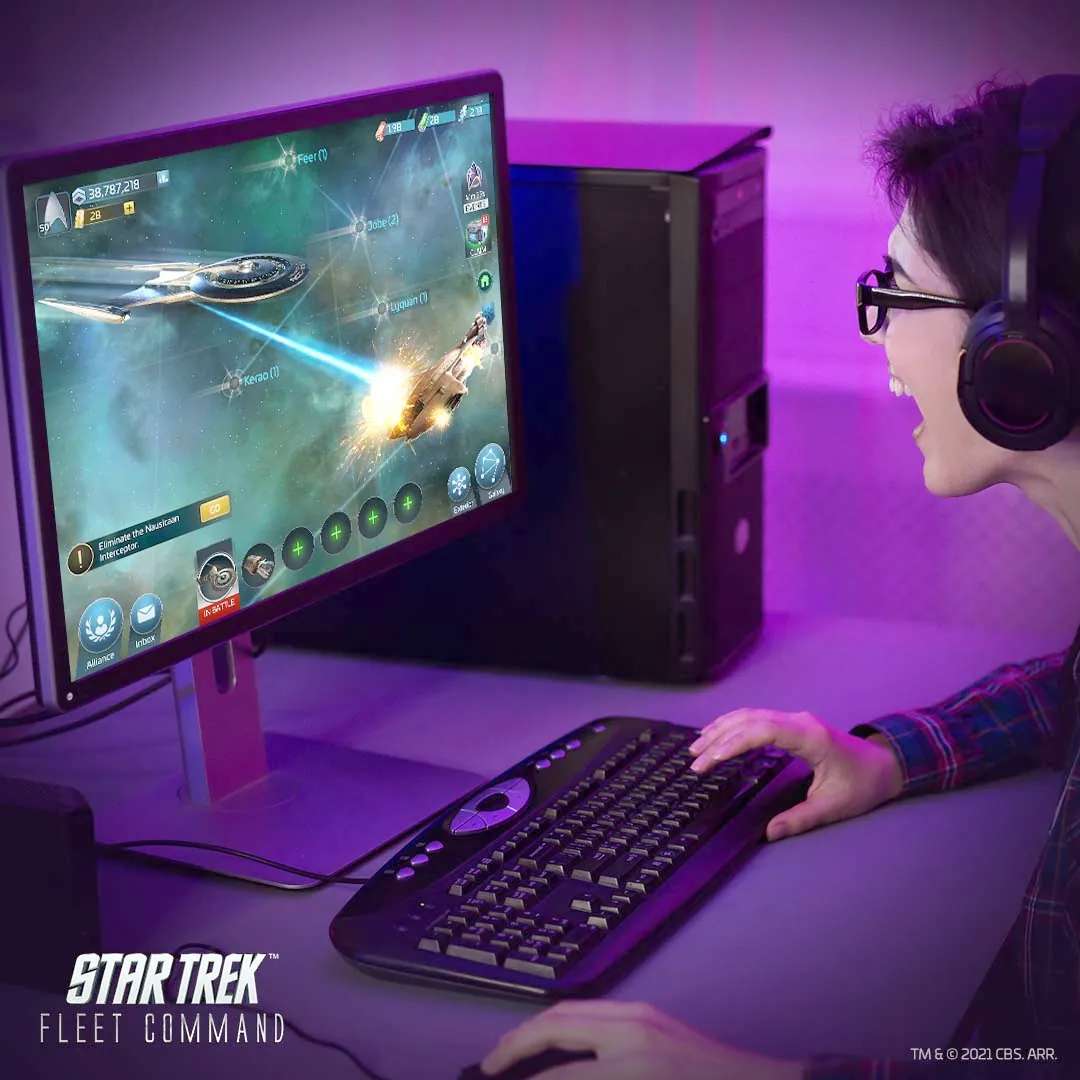
It is not on Steam. A Steam search returns another game, Star Trek: Starfleet Command Gold Edition, a paid title by Interplay with a similar name. The PC game is Scopely's own client, so the only safe place to start is the official site.
What are the Star Trek Fleet Command PC requirements?
Scopely publishes no minimum or recommended PC requirements for Star Trek Fleet Command. We checked the PC page, the homepage and the PC Launch article in the help center on November 10, 2026, and none lists a Windows version, processor, graphics card, memory or macOS version.
| What you want to know | What Scopely publishes |
|---|---|
| Windows version, CPU, GPU, RAM | Nothing found |
| macOS version and chip | Nothing found |
| Install size on PC | Nothing found; the iOS app is listed at 998.5 MB on the US App Store, and the November 5 update asked players for 360 MB of extra content |
Be careful with the numbers you will find elsewhere. They describe an Android emulator, not the PC client: the BlueStacks blog lists Windows 7 or later, 2 GB of RAM and 5 GB of disk space for BlueStacks itself (BlueStacks, January 2024), while LDPlayer's page lists an Intel i3-8100, a GTX 1050 Ti and 8 GB of RAM for its own emulator (LDPlayer, October 2026). They disagree because they measure different programs. Scopely gives no figure to compare your PC against, so the practical test is to install the client, which is free.
For a reference point, here is the PC I use for this game, which is not the one I use for War Thunder: an entry-level graphics card and 8 GB of RAM. The official launcher installed the game with no problems.
How to install Star Trek Fleet Command on PC
Get the client only from startrekfleetcommand.com, not from a search ad or a mirror, because the account steps below only work with Scopely's own client. The steps come from the help center's PC Launch article.
If you already play on your phone:
- Save your game with a Scopely Account on your phone or tablet.
- On startrekfleetcommand.com, pick the PC or Mac OS version. The installer starts and you run it.
- Open the app and choose to join with your Scopely Account.
- Enter the credentials of the account from step 1. Your game loads.
If you are new:
- Install the client and play the tutorial without an account.
- Save your game with a Scopely Account from Settings > General.
- After that, the same game opens on any platform with those credentials.
On Mac, the help center says the game must be installed in the Applications folder. On Windows, the Windows button on Scopely's PC page points to a file named STFC_installer.exe on installer.launcher.xsolla.com at the time of our check (November 10, 2026), so an installer served from anywhere else is not the file Scopely links. If you want to try it, get Star Trek Fleet Command on your PC for freeget Star Trek Fleet Command on your PC for free. The 35-second clip below is the only official video we have for the game; it shows a ship upgrade, not the PC client.
Will my phone progress carry over to PC?
Yes, once your game is saved with a Scopely Account. Scopely's launch announcement of September 21, 2021 promises cross-progression, so players can move between devices with the fleets they built on mobile, and the PC Launch article says a saved game "can be accessed cross-platform using the Scopely Account credentials." Do it before you install the client, because the existing-player steps start with a saved account.
One change to plan for: on February 26, 2026, Scopely said it is "removing passwords as a login method for Scopely Accounts", starting with an optional passwordless login and later making an email code the default (Stability Fixes & Login Security Improvements). Existing passwords still worked at that date. Scopely's advice is to keep access to the email linked to your account, and to contact Customer Support quickly if you lose it. The first steps after login, from missions to Ops 15, are in our beginner guide for new players.
What is different on PC?
The September 20, 2021 announcement lists PC perks. Several were launch offers, so check in game before you count on any of them:
- A bigger, adjustable window. "STFC on PC gives players a bigger screen, with an adjustable window", plus an extended zoom setting.
- An extra daily chest. "An additional 24 hours daily chest" for PC players.
- Welcome gifts. An avatar, a frame and 1,600 Ultra Recruit Tokens, for players who logged in on PC from September 20, 2021 or finished the tutorial there.
- Multiphasic credits. A currency earned on purchases made through the PC platform. Scopely's October 22, 2026 post mentions a "Multiphasic Exchange" update (Division 12 - Week 2), so the currency still exists; whether the earning rule is unchanged is not stated.
PC and phone players share the game's social features: Scopely's launch announcement says cross-play unites them in Alliances and the Battlepass.
Official client or Android emulator?
Use the official client. It is built by Scopely, signs in with your Scopely Account and does not depend on an emulator's own login. Emulator pages still rank for this search, and two of them contain claims that Scopely's own pages contradict:
| Claim | Where | What Scopely says |
|---|---|---|
| The game "is currently only available to play on phones" | BlueStacks blog, January 21, 2024 | A PC version has been open to everyone since September 20, 2021 |
| "The game is not crossplatform", and progress "will not work from iOS" | Mobi.gg, updated July 28, 2026 | Progress is saved to a Scopely Account and loaded on PC or Mac with it |
Both pages describe running the Android app in an emulator, which is a different route from the one Scopely documents. You do not need it to play on a computer.
FAQ
Can I play Star Trek Fleet Command on PC?
Yes. Scopely released an official PC client for Windows on September 20, 2021 and a Mac version on March 1, 2023. Scopely calls the PC game free, and both are linked from startrekfleetcommand.com. You do not need an Android emulator.
Is Star Trek Fleet Command cross-platform?
Yes. Scopely says PC and mobile players share one game through a Scopely Account. Save your game with that account on your phone, then sign in with it on PC.
Is Star Trek Fleet Command on Steam?
No. Steam does not list the game. It sells Star Trek: Starfleet Command Gold Edition, a different, paid game with a similar name.
What are the Star Trek Fleet Command PC requirements?
Scopely publishes none on its PC page, homepage or help center. Figures on emulator sites describe the emulator, not the game, so treat them as unconfirmed.
Does Star Trek Fleet Command work on a Mac?
Yes. Scopely's Mac client has been available since March 1, 2023. Install the game in the Applications folder, as the help center says. Scopely does not state a minimum macOS version.
All the pages about the game are listed in the Star Trek Fleet Command game page.
Sources
- PC Launch (Windows & macOS), Star Trek Fleet Command Help Center (about October 2025), checked November 10, 2026
- Star Trek Fleet Command PC page, startrekfleetcommand.com, checked November 10, 2026
- Star Trek Fleet Command, Scopely's game site, platform buttons, checked November 10, 2026
- Star Trek Fleet Command on a bigger screen, September 20, 2021, checked November 10, 2026
- The hit mobile game Star Trek Fleet Command is now available on PC, Scopely, September 21, 2021, checked November 10, 2026
- Mac is now live, March 1, 2023, checked November 10, 2026
- Update: Stability Fixes & Login Security Improvements, February 26, 2026, checked November 10, 2026
- Division 12 - Update & Bug Fixes, November 5, 2026, checked November 10, 2026
- Division 12 - Week 2, October 22, 2026, checked November 10, 2026
- Star Trek Fleet Command on the App Store (US), app size, checked November 10, 2026
- Star Trek: Starfleet Command Gold Edition, Steam, checked November 10, 2026
- How to Play STFC on PC, BlueStacks blog, January 21, 2024, checked November 10, 2026
- How to play Star Trek Fleet Command on PC or Mac?, Mobi.gg, updated July 28, 2026, checked November 10, 2026
- Star Trek Fleet Command on PC, LDPlayer, updated October 12, 2026, checked November 10, 2026
Everything else lives in the Star Trek Fleet Command hub · Star Trek Fleet Command Tier List: Best Ships (2026) · Star Trek Fleet Command Research Tree: Priorities (2026).